AI Test Case Generator Overview
2 min read
The AI Test Case Generator drafts test cases for you from your requirements, notes you paste in, documents you attach, and your project’s Canon documents.
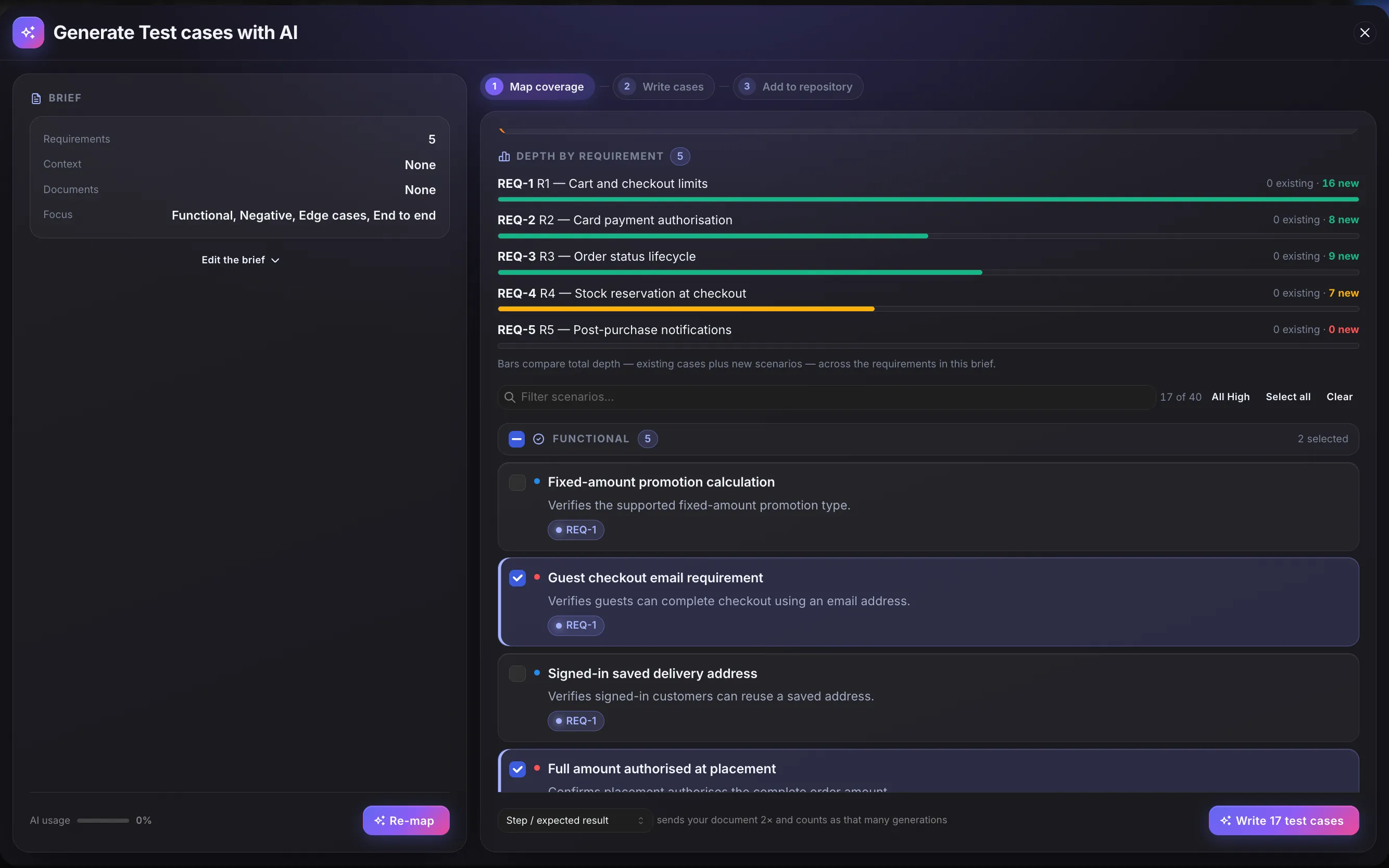
It works in two stages. First it maps coverage: a list of one-line scenarios (things worth testing) that you can scan quickly. Then it writes full test cases, with steps and expected results, only for the scenarios you tick.
Nothing is saved until you add it to the repository.
Why Two Stages
Section titled “Why Two Stages”A quick scenario list is easier to check than finished cases. You can read forty one-line scenarios in a minute and spot what’s missing. With ten finished test cases, you would have to already know what should be there to notice what isn’t.
So you review and approve the scenario list first, and only then are test cases written.
Where to Start It
Section titled “Where to Start It”- Repository: select Draft test cases with Oracle (the sparkle icon in the action rail). In a project with no test cases yet, the Draft with Oracle button does the same. This opens the generator, where you can combine several requirements, notes and documents in one brief. The rest of this section describes this flow.
- Atlas: send an Atlas item or journey to the generator. See Generate Test Cases from Atlas.
To draft test cases for a single requirement, open the generator from Repository and pick only that requirement. See Draft from a requirement.
What It Works From
Section titled “What It Works From”A brief can combine any of:
- Requirements you pick from the project.
- Additional context you type or paste in: rules or edge cases the requirements don’t state.
- Documents you attach: PDF, Word, Markdown or plain text.
- Your Canon documents: the project’s Canon documents are used too, unless you turn off Ground in Canon. See The coverage map.
The generator doesn’t read your existing test cases’ steps, your issue tracker, or anything outside this list. It does look at the titles of test cases already linked to your chosen requirements, so it doesn’t suggest what you already have.
What Comes Out
Section titled “What Comes Out”Accepted test cases are ordinary test cases. They are active as soon as they’re added, get their own test case code, sit in the folder you chose, and link to the requirements they cover.
They carry an AI tag so you can always tell where they came from. On the test case, a Generated by Oracle panel shows the Scenario it was written for and the Lens (the focus, such as Negative or Edge cases) that produced it. There is no draft, review or approval status to move them out of.
While you review drafts, each one shows source tags for any Canon documents it used, so you can check where a detail came from.
What It Won’t Do
Section titled “What It Won’t Do”- It doesn’t generate requirements, test suites, releases or defects. Test cases only.
- It doesn’t read your Jira or any source outside the brief and your Canon documents.
- It doesn’t save anything on its own, run in the background, or regenerate on a schedule.
- It doesn’t make up detail. If the source is too thin, it returns fewer scenarios and says so, instead of padding the list.