Creating Shared Steps
Shared Steps allow you to define reusable test steps once and use them across multiple test cases. This helps maintain consistency, reduce duplication, and simplify updates when common steps change.
The Create Shared Step experience is the same for both Workspace-level and Project-level shared steps. The difference lies only in their scope.
Accessing Shared Steps
Shared Steps are available from the top navigation: Configuration → Shared Steps
- Creating from Workspace configuration creates a Workspace Shared Step
- Creating from Project configuration creates a Project Shared Step
Workspace vs Project Shared Steps
Workspace Shared Steps
- Available immediately in all projects
- Ideal for organization-wide flows (login, setup, cleanup, navigation)
- Changes impact every project that uses the step
Project Shared Steps
- Available only within the selected project
- Useful for project-specific or experimental flows
- Changes affect only that project
Creating a Shared Step
When you open Create Shared Step, you’ll see the following fields:
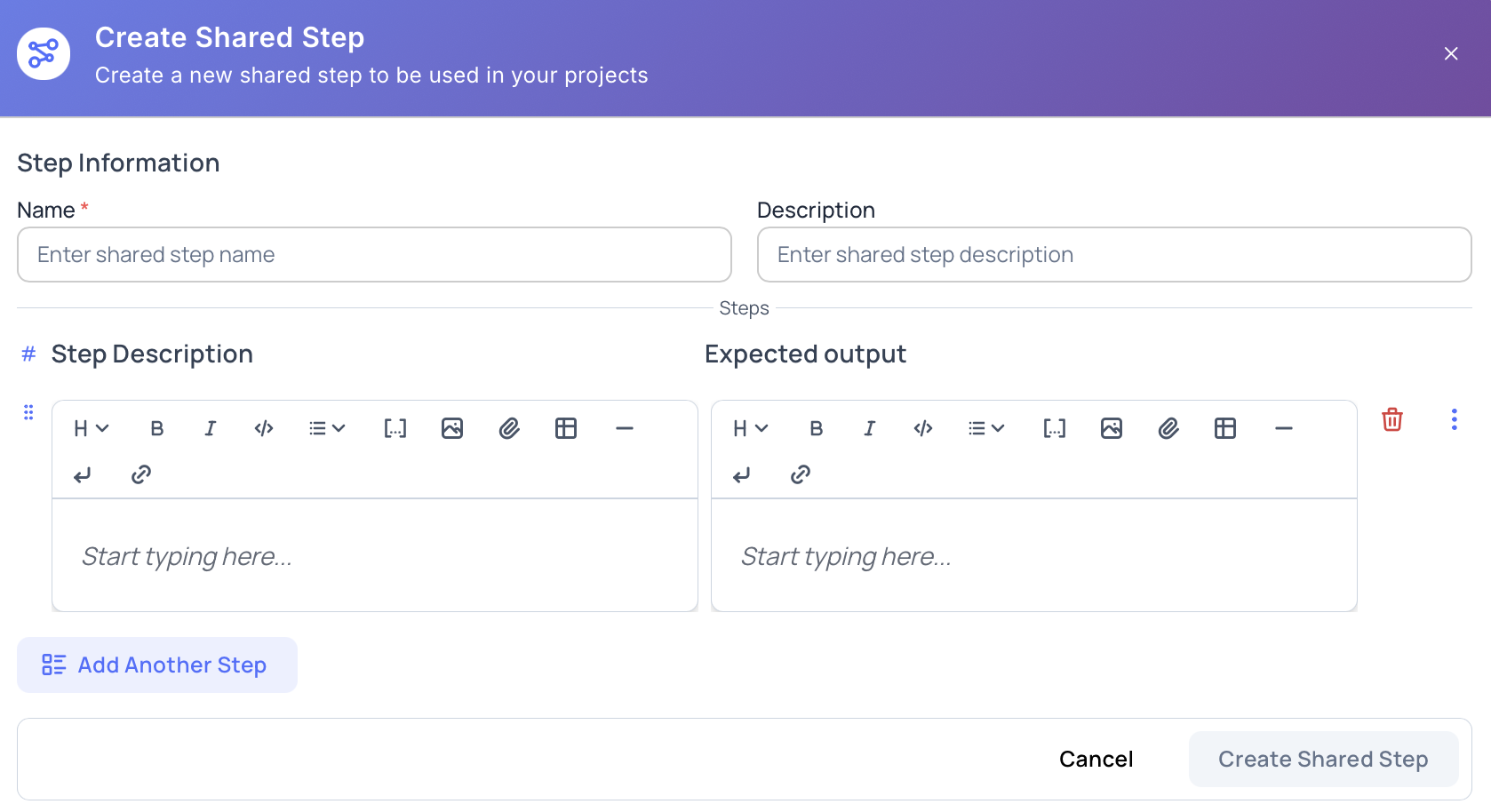
Name (Required)
- A clear, reusable name (e.g., Login with valid credentials)
- Should describe the intent, not the implementation
Description (Optional)
- Explains when and why the shared step should be used
Defining Steps
Each Shared Step can contain one or more steps.
Step Description
- Action to be performed
- Supports rich text formatting
- Supports parameters (
$) and inline variables - Supports tables, links, and formatting (media support depends on editor rules)
Expected Output
- What should happen after the step
- Helps improve clarity during execution and reviews
Add Another Step
- Click Add Another Step to include multiple actions
- Steps can be reordered or removed before saving
Editing Shared Steps
- Shared steps can be edited at any time
- Changes automatically reflect in all test cases where they are used
- Use caution when modifying workspace shared steps as they impact multiple projects
Deleting Shared Steps
When deleting a shared step that is already in use, Hawzu provides safe options:
-
Remove from usages
- The shared step reference is removed
- Test cases remain intact without the step
-
Convert to regular steps
- The shared step is expanded into normal test steps
- Test cases retain the content but lose the shared reference
This prevents accidental data loss and gives you full control over cleanup.
Best Practices
- Use Workspace Shared Steps for common flows used everywhere
- Use Project Shared Steps for project-specific logic
- Keep shared steps small and focused
- Avoid embedding too much logic in a single shared step
- Review shared step changes carefully before saving
Next Steps
- Learn about Managing Shared Steps
- Read Shared Steps Best Practices
- Explore Parameters for dynamic steps